Showing posts with label Technical. Show all posts

Thursday, November 20, 2025


This is a Facit calculator. Type in numbers. To multiply turn the handle as many as wanted. You move along for big numbers. Fun but it was first real machine I had at work. This is 1960s. I was quite proficient.

Friday, March 22, 2013

What is a good RSS reader now that Google RSS is closing?

My son asked on Facebook and this is copy/paste/edit of my comment to Dave
What is a good RSS reader now that Google RSS is closing?
  • My current reader

  • FeedDemon but its a download for Windows -
    http://bradsoft.com/
    BUT read Nick's comments on google closing http://nick.typepad.com/
  • Nick is going to make it Free and no sync to google but of course its Windows desktop

    FeedDemon - Free Windows RSS Reader
  • What I like is quick to load feeds
  • And I like to scan feeds – open ones I want and pass to next feed with a All READ for previous feeds – which FeedDemon does Plus an option only show the Unread ie new feeds- another recommended download Sharpreader shows all the feeds even those without current posts so boring and unproductive
  •  

    Web based ones - Lifehacker suggested some but methinks some are impacted by volume of new users esp oldreader
  • Now I have managed to load it Feedly http://www.feedly.com looks very possible
    Lots of features and a quick way to mark all read – click the number on right and arrow to move to next bunch and it handles a folder of feeds as one 
    So I agree this overview
    Feedly. A fast and stylish way to read and share the content of your favorite sites.


http://theoldreader.com/ but I waiting for my imports to happen - was queue of 27000 Monday now 3300 - outline sounded good so I am monitoring
http://www.netvibes.com/ I had already but have loaded my feeds and its a maybe
Looks like I have to select READ for each bunch of feeds
Will post more when Oldreader comes up but it is looking like Feedly as its web based

I've now seen OldReader and Feedly but whilst FeedDemon is still around I like it ......


Monday, December 10, 2012

Windows 8: Windows Live Writer

As I’ve managed to install Windows 8 I am now using Live Writer as test of Blog update

Well it Published this test blog easily

So I will try it for now
Friday, November 18, 2011

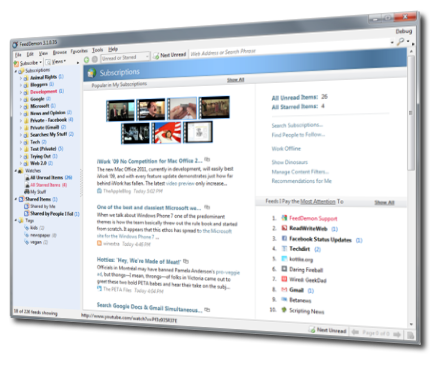
Computers: News/RSS Readers - recommend for FeedDemon

 I like to read news etc via RSS Feeds. RSS was rumoured to be on way out BUT still seems to be healthy.....

I used to use Bloglines then they dropped off.... So I switched to Google Reader but alas this month they changed the layout to something they implied was simple - BUT its ghastly absolutely useless for quick eyeball scan of Headlines etc.

So I went looking - Wanted features - able to read import the google reader subscription list - clearly highlights the Unread sites (I don't want to see all my subs listed) and work through them - and finally a quick for each sub as I scan "Mark All Read " ---- PLUS LOOKS GOOD

sites recommended various tools
and I tried these four
BlogExpress
SharpReader
Awasu
JetBrains OmeaReader
All handled the Import of sub list and mostly looked ok
But they usually failed on the Mark All Read button and the Only the Unread.....

The Winner was FeedDemon - Free Windows RSS Reader

handled everything I wanted and looks good - even handles Facebook notifiers
but alas not Twitter - looks like it used but Twitter changed and stopped it working

Tuesday, November 11, 2008

iTunes, iPod, Mediamonkey and Music Library

We have ordered an iPod and I am trying to understand HOW recordings are indexed to put on the iPod. I am talking the Holy Bible (55 CDs), Christian Worship, Classical singing and orchestral and some plain old performances by artists.
It seems to me that iTunes is designed for Pop music fans. It calls tracks songs and the main groups are Album and Artist. The Audiobooks and Podcast seem to refer to downloads from iTunes. Even then speech is called songs.

Even with its focus on Popular iTunes does not handle compiliations well - see this
and one post is a detailed discussion on what to do
Apple - Support - Discussions - iTunes sorting issue. ...
BTW Compiliations can only be found in Help with a Search and then it was not clear where it was - it is last tab when you click right on a group selection and select Getinfo

So I am now using Mediamonkey MM (sorry Mac users it is Windows)
It is like having a spreadsheet of the music list and you can quickly change tags.

I found from others that for iPod to keep a wanted sequnce you do need Disc numbers and track numbers. MM has a Tool that autofills track number when you have recordings in wanted sequence.

I will be adding more to this as I go - mostly I need the iPod to load and see perhaps end of week it arrives

Thursday, June 26, 2008

I fixed the washing machine


Chris said it was not spinning well and I thought a blockage. The Bosch WFB 4001 manual said "pump blockage". Checked a couple of comments on

Pump blocked message - FixYa

Relooked at the manual and realised it had some numbered pictures at the back and things started to come clear.

Remove front plate - two indent screw tops - one of either side - turn right with large screwdriver and plate pops off.
Then on right side unscrew the plug. I first did this a year ago and this time it was difficult as some coins slipped into the thread as I was undoing. Anyhow I found $5.05 (two $2 one $1 and 5c) and 20 pence - where did the pence come from.
The plug goes back easy.
The plate you have to align the pop out holders.

Saturday, January 05, 2008

Is Internet Banking safe - Is Facebook safe - Phishing

I am amazed that I get so much spam that are fake notes from financial institutions. As I use Thunderbird -with text only I immediately see that the links to banks are fake. In HTML these notes would look fair dinkum. I get notes from all manner of "fake" banks - and also PayPal and eBay. None from the company themselves.

Now this excellent article tells me that people do respond to these emails.
Is internet banking safe? - Security - Technology - smh.com.au
Do have a read some helpful stuff re online banking.

Then other ways of getting your VITAL details - at sites like Facebook
BBC NEWS | Technology | Cyber thieves target social sites

And beware pages that want your password in Facebook - check URL is still facebook
Phishing For Facebook

Oh and if a note I trust arrives in TB and I want to see in html I have installed the addon
ShowHTML and one click and all looks good.

Thursday, November 15, 2007

HTML editors - some thoughts on WYSIWYG tools

Research in Feb 2007

I am thinking of future and whether I will go Linux/Ubuntu etc or MacBook

Currently my web sites are written with Frontpage 2000

Sorry purists I want WYSIWYG

This is very sophisticated - I will use to check my html - HTML-Kit - http://www.chami.com/html-kit/

This is helpful
<http://en.wikipedia.org/wiki/Comparison_of_WYSIWYG_HTML_editors>

some of these look quite powerful but Html only

AceHTML, a Free HTML Editor
http://software.visicommedia.com/en/products/acehtmlfreeware/?id=51

openbexi - very much Beta - strange looking colours - maybe if they
release a working version

http://geniisoft.com/showcase.nsf/WebEditors
well worth exploring - lists many editors I have not checked yet

http://www.openwebware.com/products/openwysiwyg/
- hard to install meant for experts in CMS and Java

And I am bookmarking these for future thoughts
http://quanta.kdewebdev.org/bugs.php
http://aptana.com/
http://tinymce.moxiecode.com/documentation.php

http://www.mozilla.org/projects/seamonkey/
I tried- bit lost as why it has email etc when Mozilla has TB and FP
Now I worked out NVU is a development from it so I am uninstalling

Xstandard - the free lite version does not enough features - the Pro for
example has Split Table Cell - but why buy

Dynamic HTML Editor
http://www.dynamic-html-editor.com/en_download.asp#dhefree
I tried the 1.9 version - appears to be rubbish
would not open an Html file appears to want some file of its invention
to me that is Goodbye

Tried trial version of Adobe Contribute - it appears to have a special
group network purpose and restrictions such as Template comes from
Dreamweaver - you might as well pay the extra for Dreamweaver

This is for MAC - so if I go MacBook I will have iWeb but if not quite
for my major webs - I might try this
http://en.wikipedia.org/wiki/RapidWeaver

So I'll keep looking at NVU - no recent release but seems to work.
Kompozer is supposed to be NVU with some bug fixes

Does allow Template - but I have to learn how to use - currently I use
include page in FP

Does not have image mapping tool for hotspots like FP but does allow
insert of the code - and in image properties has a Image Map remove
button - strange way to do things.
So I need Image mapping - Gimp is supposed to do it - Xnview has a help
page but nothing clear on how to do


November 2007 Some new stuff I will look at
Writing this away from home so not yet downloading

http://www.aptana.com/products/studio_community.php sounds very functional - except HTML editor only not WYSIWYG

http://www.sitestudio.tk/ - no longer developed but write up sounds good and there are downloads - however no help to explain - nothing intuitive about it - Don't bother with it

http://www.karelia.com/ SANDVOX - has try it

http://www.apple.com/ilife/iweb/
iWeb is not a major tool - its really just Apple's interface to .MAC .
You could use it to create another web site but you cannot import already created web pages.
and you need to backup the Domain file else if you move machines etc you will not be able to use iWeb to edit the old pages.
This is an excellent summary Practicalmadness by David Demaree | Regarding iWeb

http://www.softpress.com they have a Freeway XLE free to try and discounts - I got a Serial number for XLE but where is download - so I set a note asking - and it looks like it is a fresh web site - you cannot import - well I have asked that too

http://www.panic.com/coda/ I think there is a free trial - HTML editor only

http://www.virtualmechanics.com/downloads/index.html

Wednesday, October 17, 2007

ImgBurn - burn CDs and DVD

The Official ImgBurn Website

ImgBurn is a lightweight CD / DVD / HD DVD / Blu-ray burning application that everyone should have in their toolkit!

They are not joking

ImgBurn supports all the Windows OS's - Windows 95, 98, Me, NT, 2000, XP, 2003 and Vista (including all the 64-bit versions). If you use Wine, it should also run on Linux and other x86-based Unixes.

Saturday, September 29, 2007

Clutter


Al Gore rocks multiple monitors

This looks like a lovely work arrangement - is it 3 big screens - but look at the desk - I am trying NOT to be like that - it is hard.
I don't think this works either Tina Fey organises with Post-Its
but least it gets you looking at Lifehacker Australia | Tech tips to help you at work and play
as well as things about putting power boards and cables in boxes with holes drilled
and they had a post to
Getting Things Done Guru David Allen and His Cult of Hyperefficiency

The essence seems to be

THREE RULES

1. Collect and describe all the stuff. Everything must be inventoried without distinction or prejudice. Errands, emails, a problem with a friend: It all must be noted for processing. Small objects, such as an invitation or a receipt, go into a pile. Everything else can be represented with a few words on a piece of paper ("find keys," "change jobs"). Once the stuff is collected, processing begins. Anything that requires two minutes or less is handled on the spot. The remainder is governed by the second rule.

2. All stuff must be handled in a precise way. Allen offers dozens of clever tricks for classifying, labeling, and retrieving stuff. Expert users of GTD never leave old emails cluttering their inbox, for instance. Nor do they have to rifle through a bunch of paper to see if there's anything crucial they've left undone. Emails to be answered are in a separate folder from emails that merely have to be read; there's a file for every colleague and friend; stuff that must be done has been identified and placed on one of several kinds of to-do lists. Allen calls his to-do lists next-action lists, which are subject to the third rule.

3. Items on next-action lists should be described as concretely as possible. Breaking down stuff into physical actions, Allen says, is the key to getting things done.

I know these arer so similar to other systems but something has to work

Whoops that is TWO minutes - now for something else


Tuesday, September 25, 2007

Lifehacker is a most interesting RSS

I have them on my Bloglines and picking up all manner of useful stuff

Just read on how to put a power board into a box with holes on top so all my charging stuff in one uncluttered place

clutter | Lifehacker Australia

Lots more

The Happiness Project: A simple, easy, cheap way to fight the clutter that appears on your desk.

The Happiness Project: A simple, easy, cheap way to fight the clutter that appears on your desk.

I like this - one pad , write all things for that day on it- do something with the page at the end of the day.

I'd say a Book and you can tear/rip pages out.

Phone numbers make sure you write WHOSE - so often I find a number on a paper and no idea who it was

Thursday, September 20, 2007

Pullquotes

I always liked how my son's wife Joy of Lankshear Design when setting up magazine articles uses pullquotes.

Pullquotes are Cool

A poster on FrontPage-L Resources highlighted
Snazzy Pullquotes for Your Blog — Pearsonified
which looks really cool. But I had trouble getting it to work

Then I found a simpler version Increase Your Blog’s Readability
which worked straight off. Not sure why that worked and other was difficult as the pullquote tags look the same.

The first blog I used it on was GO Russell - What are you doing Morris

Wednesday, September 19, 2007

Jottit

My Jottit

and I agree with the title of their message

That was easy!

Here's your new site. Be sure to bookmark it so you can find it again. To change it, just press the edit button at the bottom of the page. Enjoy!


and this is all it took

I am just trying which I read about on rojo.com At http://jottit.com/ a box appears in which I am typing and I am about to click "create a page" let's see

And up came my page and I selected a password and then its either public or private or open to all

And I just changed the URL

Ron's Jottings: Home

http://ronlankshear.jottit.com/

Tuesday, September 18, 2007

DiffMerge

SourceGear | DiffMerge | downloads

DiffMerge is an application to visually compare and merge files for Windows, Mac OS X and Unix.
One feature also interests me
Folder Diff. Performs a side-by-side comparison of 2 folders, showing which files are only present in one file or the other, as well as file pairs which are identical or different.

Just downloaded and tried and it looks good
Could be great for keeping my external HD and Macbook and Desktop in sync